Migrate Schemas from Confluent Schema Registry
|
This feature requires an enterprise license. To get a trial license key or extend your trial period, generate a new trial license key. To purchase a license, contact Redpanda Sales. If Redpanda has enterprise features enabled and it cannot find a valid license, restrictions apply. |
When you migrate to Redpanda from a deployment that uses a Confluent Schema Registry, your producers and consumers depend on the schemas stored in that registry. Shadowing removes this migration obstacle: a shadow link continuously replicates schemas from the source Confluent Schema Registry into the Schema Registry built into the Redpanda shadow cluster, preserving subject names, versions, and compatibility settings. Because both registries stay synchronized until cutover, your applications keep working on Redpanda without a separate schema migration step. Use this approach when you migrate from Confluent to Redpanda, or when you maintain a Redpanda disaster recovery cluster for a system that keeps its schemas in a Confluent Schema Registry.
After reading this page, you will be able to:
-
Configure a shadow link that continuously replicates schemas from a Confluent Schema Registry
-
Filter replication by context or subject and map source contexts to destination contexts
-
Monitor schema replication status and resolve validation errors
How HTTP API schema replication works
When you configure a shadow link with the shadow_schema_registry_api option, the shadow cluster polls the source Schema Registry over HTTP and imports changes into its own Schema Registry. Two sync cycles keep the registries in step:
-
Tail syncs run frequently (default: every 10 seconds) to pick up incremental changes.
-
Full syncs scan all selected subjects (default: every 5 minutes) to catch anything a tail sync missed.
Replicated schemas keep their original subject names and version IDs, so producers and consumers that reference schemas by ID continue to work after failover. Schemas that reference other schemas import in dependency order.
Before importing a schema, Redpanda validates it against the Redpanda Schema Registry implementation. If a schema uses features that Redpanda does not support, the sync either reports an error and skips the schema, or removes the unsupported fields and imports the rest, depending on the validation policy you choose.
While the link is active, the destination contexts that the link replicates into are read-only: the shadow cluster rejects client writes to those contexts so that replicated schemas remain identical to the source. Contexts outside the link’s filter remain writable.
|
This API-based mode is an alternative to the byte-for-byte
Schema replication settings live in the shadow link configuration. Two cluster properties, |
Use cases
-
Migrate from Confluent to Redpanda: Replicate schemas continuously while Shadowing replicates your topic data, then cut applications over to Redpanda once both are in sync. No separate schema migration tooling is required.
-
Phased migration: Use context and subject filters to migrate one team, application, or environment at a time.
-
Registry reorganization: Map source contexts to different destination contexts to restructure your Schema Registry as part of the migration.
Prerequisites
-
A cluster running Redpanda version 26.2 or later. The schema replication feature activates after all brokers complete the upgrade.
-
To configure schema replication in Redpanda Console rather than with
rpk, Redpanda Console v3.9.0 or later. The Schema Registry fields appear only when the shadow cluster reports Redpanda 26.2 or later. On an earlier cluster, Redpanda Console falls back to a single toggle that enables_schemastopic replication, and API mode is unavailable. -
Network connectivity from the shadow cluster to the source Schema Registry HTTP endpoint.
-
Credentials for the source registry with permission to read subjects, versions, and configuration. For Confluent Cloud, use a Schema Registry API key and secret.
-
Basic Shadow link settings. See Configure Shadowing.
-
The destination contexts that the link replicates into, as determined by your
source_filteranddestinationmapping, must be empty on the shadow cluster. The rest of the shadow cluster’s Schema Registry does not need to be empty: contexts outside the link’s mappings are unaffected. -
To replicate contexts other than the default context, the
schema_registry_enable_qualified_subjectscluster property must be enabled on the shadow cluster (the default). See Schema Registry Contexts.
Limitations
-
HTTP basic authentication and mTLS are the supported authentication methods for the source registry. You can also connect to a source registry that requires no authentication.
-
Replication is one way, from the source registry to the shadow cluster. Destination contexts owned by the link are read-only until failover.
-
Schemas that use Confluent features not supported by the Redpanda Schema Registry are not replicated as-is. Choose a validation policy to control whether these schemas are skipped or imported without the unsupported fields.
-
Topic data replication and schema replication are coordinated, but not immediately consistent: schema arrival on the shadow cluster can be delayed by the tail refresh interval (
tail_interval), which defaults to 10 seconds. Records serialized in the Confluent SerDes wire format can therefore arrive before the schema IDs they contain. This does not cause replication errors, because schema IDs are not validated during topic data replication, but consumers that look up those schema IDs on the shadow cluster fail until the schemas arrive. See Monitor replication status. -
Role synchronization requires a Redpanda source. Leave
role_sync_optionsunconfigured when the source is a Confluent cluster: a Roles Migrator task pointed at a non-Redpanda source reportsLINK_UNAVAILABLEwhile the link itself staysACTIVE. -
Deleting and recreating a subject: A hard delete on the source replicates on the next sync, not instantly. Wait until the subject is removed from the shadow cluster before registering a new schema under the same name, as recreating it too soon prevents the sync job from detecting the subject/subject-version change.
Configure schema replication
Schema replication is one synchronization task on a shadow link. You configure it by adding the shadow_schema_registry_api option to the schema_registry_sync_options section of the same shadow link that replicates your topic data, consumer offsets, and ACLs. The sections below extend the shadow link configuration described in Configure Shadowing; they do not replace it.
|
A shadow link whose configuration contains only |
This workflow builds the configuration file that rpk shadow create consumes.
The following collapsible sample shows where the schema replication settings sit in a complete shadow link configuration file. The highlighted lines are the schema replication settings, which the sections that follow explain.
Explore a sample configuration file
# Sample shadow link configuration with API-mode Schema Registry replication

name: confluent-migration                    # Unique name for this shadow link

client_options:
  bootstrap_servers:                         # Source Kafka cluster brokers
  - <source-broker-1>:<port>                 # Example: "pkc-xxxxx.us-east-1.aws.confluent.cloud:9092"
  - <source-broker-2>:<port>
  # For the TLS and authentication settings that the shadow cluster uses to
  # connect to the source Kafka cluster, see the complete configuration file
  # reference in Configure Shadowing.

# Keep the rest of your migration in the same file. Without these sections,
# the link replicates schemas only.
topic_metadata_sync_options:
  # ...your topic replication settings...
consumer_offset_sync_options:
  # ...your consumer offset settings...
security_sync_options:
  # ...your ACL replication settings...

schema_registry_sync_options:
  shadow_schema_registry_api:                # API mode: replicate from a Confluent Schema Registry
    source_url: https://psrc-xxxxx.us-east-1.aws.confluent.cloud   # Source Schema Registry endpoint
    auth_options:
      basic:
        username: <sr-api-key>               # Confluent Schema Registry API key
        password: <sr-api-secret>            # Confluent Schema Registry API secret
    tls_settings:
      enabled: true                          # Use TLS for the connection
    tail_interval: 10s                       # Optional: poll for incremental changes (default: 10s)
    full_sync_interval: 5m                   # Optional: full source scan interval (default: 5m)
    max_source_requests_per_second: 30       # Optional: rate limit for source requests (default: 30)
    source_filter:
      contexts:
      - "."                                  # The default context
      subjects: []                           # Empty: all subjects in the selected contexts
    destination:
      identity: {}                           # Keep source context names
    unsupported_schema_feature_policy: FAIL  # FAIL (default) or REMOVE
For the complete configuration file, including consumer offset and security synchronization options, see Configure Shadowing.
Generate a configuration template
Generate a configuration file template that includes all available fields with comments:
rpk shadow config generate --print-template -o shadow-config-template.yamlFor detailed command options, see rpk shadow config generate.
Connect to the source registry
Configure the connection to the source Schema Registry:
schema_registry_sync_options:
  shadow_schema_registry_api:
    source_url: https://psrc-xxxxx.us-east-1.aws.confluent.cloud  # Source Schema Registry endpoint
    auth_options:
      basic:
        username: <sr-api-key>                # Confluent Schema Registry API key
        password: <sr-api-secret>             # Confluent Schema Registry API secret
    tls_settings:
      enabled: true                           # Use TLS for the connection
      tls_file_settings:
        ca_path: /path/to/ca.crt              # Optional: CA certificate for custom trust
    tail_interval: 10s                        # How often to poll for incremental changes
    full_sync_interval: 5m                    # How often to run a full scan
    max_source_requests_per_second: 30        # Rate limit for requests to the source registry
The intervals and rate limit are optional. If you omit them, Redpanda uses the defaults shown above.
To authenticate to the source registry with mTLS instead of HTTP basic authentication, omit auth_options and provide a client certificate and key in tls_settings.
To connect to a source registry that requires no authentication, omit auth_options and do not provide a client certificate.
Select contexts and subjects
By default, the link replicates the entire source registry. To replicate a subset, add a source_filter with the contexts or subjects to include:
schema_registry_sync_options:
  shadow_schema_registry_api:
    # ...connection settings...
    source_filter:
      contexts:
      - ".prod"                               # Replicate this entire context
      subjects:
      - orders-value                          # One subject from the default context
The two lists combine as a union:
-
contextsselects entire contexts: every subject in each listed context replicates. -
subjectsselects individual subjects, using qualified subject syntax:orders-valueis the subject in the default context, and:.staging:orders-valueis the subject of the same name in the.stagingcontext. -
When both lists are set, the link replicates everything selected by either list. A subject selected by both lists replicates once.
For example, the preceding filter replicates every subject in the .prod context, plus the single orders-value subject from the default context.
The contexts and subjects lists accept literal names only. Wildcard and prefix patterns are not supported.
Schema Registry contexts provide independent namespaces for subjects within one registry. The default context is named .. For more information, see Schema Registry Contexts.
Map source contexts to destination contexts
Choose how replicated contexts are named on the shadow cluster:
-
identity: Keep the source context names (default behavior for migrations). -
exact: Map each source context to a different destination context.
schema_registry_sync_options:
  shadow_schema_registry_api:
    # ...connection settings and filters...
    destination:
      identity: {}                            # Keep source context names
To rename contexts during replication:
schema_registry_sync_options:
  shadow_schema_registry_api:
    # ...connection settings and filters...
    destination:
      exact:
        mappings:
        - source: "."                         # Source context
destination: ".shadow" # Destination context on the shadow cluster|
With |
Choose a validation policy
The unsupported_schema_feature_policy setting controls what happens when a source schema uses features that the Redpanda Schema Registry does not support. The unsupported Confluent Schema Registry features are:
-
In schema definitions: rule sets and metadata tags.
-
In subject configurations: override metadata, override rule sets, default metadata, default rule sets, and compatibility groups. Compatibility groups are not the same as compatibility levels, which do replicate.
The policy determines how the sync handles a schema or configuration that uses these features:
| Policy | Behavior |
|---|---|
|
The schema is not replicated. The sync records an error, reports it in the link status, and continues with the remaining schemas. |
|
The unsupported fields are removed and the rest of the schema is imported. The sync records each modification in the link status. |
schema_registry_sync_options:
  shadow_schema_registry_api:
    # ...connection settings, filters, and destination...
    unsupported_schema_feature_policy: FAIL
Create the shadow link
Create the shadow link with your completed configuration file:
rpk shadow create --config-file shadow-config.yamlFor detailed command options, see rpk shadow create.
To change the schema replication settings on an existing link, see rpk shadow update.
To create the link in Redpanda Console instead, see Configure schema replication in Redpanda Console.
Configure schema replication in Redpanda Console
Redpanda Console writes the same schema replication settings as a configuration file. The modes, filters, and validation policy behave identically; only the names of the fields differ. Use the field mapping to move between the two.
Create a shadow link with API-mode schema replication
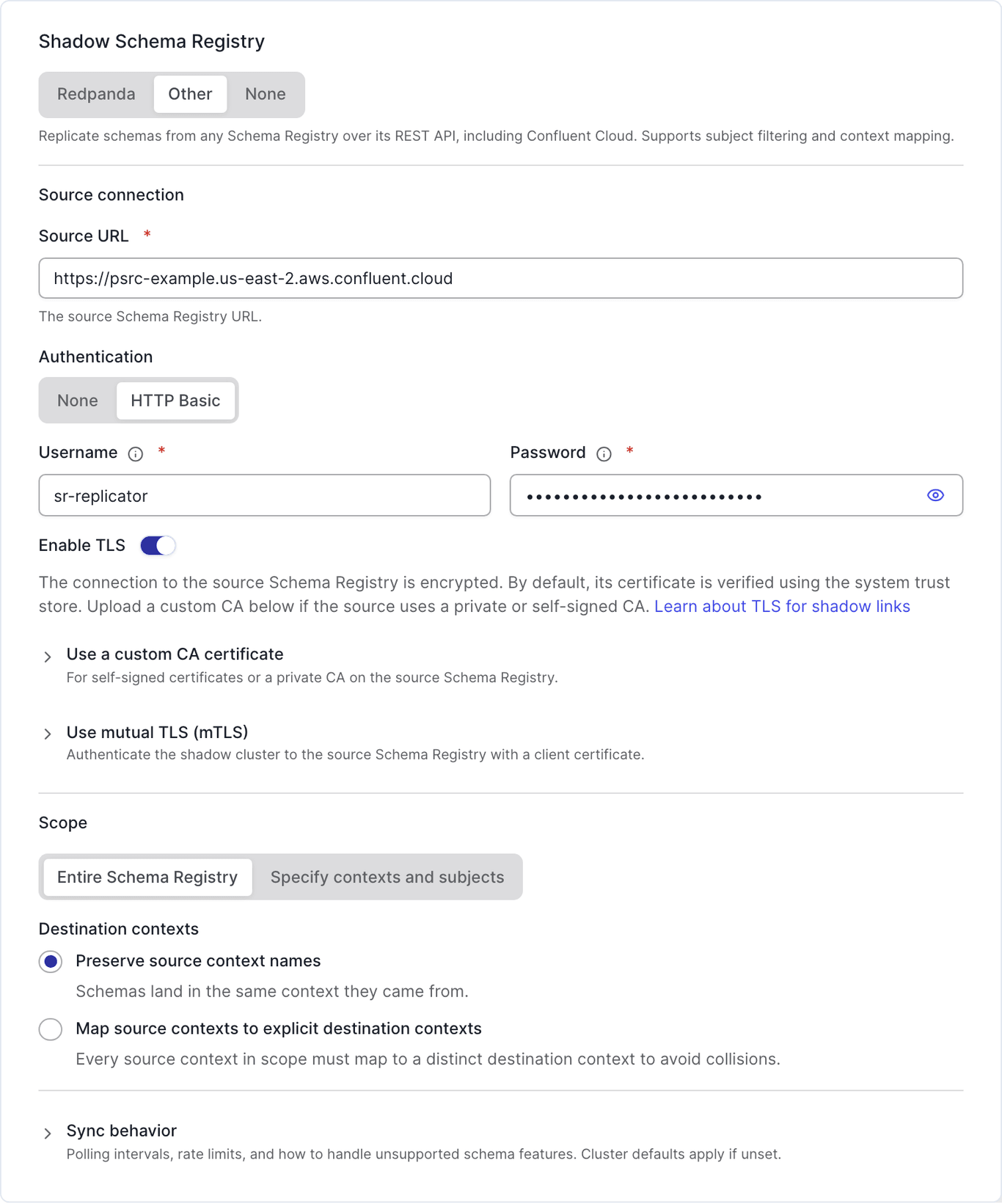
Every schema replication setting lives in the Shadow Schema Registry card. Selecting the Other mode tab reveals the source connection, scope, and sync behavior sections:
-
From the navigation menu, select Shadow Links, then click Create shadow link.
-
On the Connection step, complete the connection details for the source Kafka cluster. See Configure Shadowing.
-
On the Configuration step, in the Shadow Schema Registry card, select the Other mode tab. Other is API mode. Redpanda shadows the
_schemastopic instead, and None leaves the shadow cluster’s Schema Registry independent. -
Under Source connection, enter the Source URL of the source Schema Registry.
-
For Authentication, select the method that the source registry requires:
-
HTTP Basic: enter the Username and Password. For Confluent Cloud, these are the Schema Registry API key and secret.
-
None: Redpanda sends requests to the source registry without authentication. Also select None to authenticate with mTLS, then provide a client certificate and private key in the TLS settings in the next step.
-
-
Leave Enable TLS on to connect to the source registry over TLS. It is on by default. Turn it off only if the source registry does not use TLS. To trust a private certificate authority, upload a CA certificate. To authenticate with mTLS, provide a client certificate and private key.
-
Under Scope, choose what to replicate:
-
Entire Schema Registry replicates every context and subject.
-
Specify contexts and subjects limits replication to the Contexts and Subjects that you enter. Press Enter after each entry. The two lists combine as a union. For the selection rules and the qualified subject syntax, see Select contexts and subjects.
-
-
Under Destination contexts, select Preserve source context names to keep the source names, or Map source contexts to explicit destination contexts to rename them. With explicit mapping, every source context in scope must map to a distinct destination context. See Map source contexts to destination contexts.
-
Optional: expand Sync behavior to change the Tail interval, Full sync interval, Max source request rate, or the Unsupported schema features policy. Leave these fields empty to use the cluster defaults.
-
Click Create shadow link.
Redpanda Console does not test the source connection or list the matching subjects before you save. To confirm that the link works, verify the configuration, then monitor replication status.
Console fields and configuration keys
Most fields carry the name of the configuration key they set, such as Tail interval for tail_interval. The following fields do not:
| Redpanda Console | Configuration key |
|---|---|
Shadow Schema Registry mode: Redpanda, Other, or None |
|
Authentication: HTTP Basic or None |
|
Enable TLS, CA certificate, and client certificate and key |
|
Scope: Entire Schema Registry or Specify contexts and subjects, with Contexts and Subjects |
|
Destination contexts: Preserve source context names |
|
Destination contexts: Map source contexts to explicit destination contexts |
|
Max source request rate |
|
Unsupported schema features: Fail the sync or Remove unsupported features |
|
Edit an existing shadow link
You can change the schema replication settings of an existing link in Redpanda Console, with the following constraints:
-
You cannot switch an existing link directly between Redpanda and Other. Redpanda Console locks the unavailable tab. To use a different Schema Registry replication mode, create a new shadow link.
-
Switching away from Other discards the stored Schema Registry connection settings, including credentials, scope, and sync behavior. Redpanda Console warns you before you save.
-
Turning off Redpanda mode does not remove a
_schemasshadow topic that the link already added. To stop shadowing that topic, fail over the link, or delete the shadow topic after you save. Deleting the topic also discards the schemas that the link replicated into it, so fail over instead if you need to keep them. -
When you edit a link that uses HTTP Basic, Redpanda Console requires you to re-enter the Password. It never populates the field with the stored value, and it does not accept an empty field.
-
Redpanda Console preserves settings that it does not expose, such as
paused, when you save.
Verify the configuration
Confirm that the link is configured for API-based schema replication.
Use rpk
rpk shadow describe <link-name> --print-registryThe --print-registry flag prints the Schema Registry section, which includes the shadowing mode, source URL, sync intervals, validation policy, and your context and subject filters. Without it, rpk shadow describe prints only the overview and client sections. For detailed command options, see rpk shadow describe.
Use Redpanda Console
On the shadow link’s detail page, the Schema Registry section reports the stored configuration as read-only:
| Field | Description |
|---|---|
Connection |
The Source URL of the source Schema Registry. |
Authentication |
The authentication Type and Username. The Password shows as Set, Not set, or the date it last changed; Redpanda Console never displays the stored value. When the link does not use HTTP basic authentication, this section reports that no authentication is configured. |
TLS |
Whether TLS is Enabled, whether the Trust store is a Custom CA or the System trust store, and whether Client auth uses an mTLS certificate. |
Scope |
Either Entire Schema Registry, or the Contexts and Subjects that the link replicates. |
Destination contexts mapping |
The source-to-destination context mappings, or the source names when the link preserves them. |
Sync behavior |
The tail interval, full sync interval, max source request rate, and unsupported schema features policy. Shows Cluster defaults when the link does not override them. |
Monitor replication status
Check schema replication progress and errors for a link:
rpk shadow status <link-name>The Schema Registry section of the output reports:
| Field | Description |
|---|---|
Inventory |
The number of selected subjects and subject versions on the source, compared with the number of subjects and versions on the destination. The registries are synchronized when the destination counts match the selected source counts. A destination that is behind the source indicates that replication is still in progress. |
Current sync |
The type of the sync in progress ( |
Last full sync |
Start time, finish time, and change counts for the most recent completed full sync. |
Totals since task start |
Cumulative change and error counts since the schema replication task started. |
Last error |
The most recent replication error. With the |
The schema replication task runs on the broker and shard that hosts the leader of the _schemas topic’s partition. The counters in the status output are not persisted: expect them to reset to zero when that broker restarts or when leadership of the _schemas partition moves to another broker.
For detailed command options, see rpk shadow status. For general link monitoring, see Monitor Shadowing.
Fail over
For best results, shadow links should be failed over as a single unit, which prevents partial failover scenarios and unexpected results. Selective failover, such as topics only, does not stop schema replication. As part of failover, pause the schema replication task by setting paused: true in the schema_registry_sync_options section of the link configuration. Pausing the task stops further syncing from the source registry and makes the write-blocked destination contexts writable, so your applications can register new schemas on the promoted cluster.
For the complete failover procedure, see Failover.
Next steps
-
Configure Shadowing to replicate topic data, consumer offsets, and ACLs alongside your schemas.
